What is the best TV wall mount? Based on ratings and rating volume, the Amazon Basics full motion mount is the most reviewed by a wide margin, while the ECHOGEAR fixed mount and HOME VISION fixed mount are the best-reviewed options for larger TVs.
In short: choose a fixed mount for the slimmest look, a tilting mount if glare is an issue, and a full motion mount if you need to angle the TV, and always match the mount to your TV’s size, weight and VESA pattern.
Before you buy, check three numbers: your TV’s weight, the mount’s maximum weight and your TV’s VESA pattern, which is the spacing of the mounting holes on the back. Then check how you will attach the mount to the wall. Most mounts need to be screwed into wall studs, and the right hardware depends on the wall type.
This guide was written by researching customer ratings and product listings, not by testing each product ourselves. Below you will find our top three, how we chose, a comparison table, ten picks with honest pros and cons, a buying guide, tips and answers to common questions.

Recommended TV Wall Mounts
As an Amazon Associate we earn from qualifying purchases. These are research-based picks, not products we have tested. How we choose.


Our Top 3 Picks
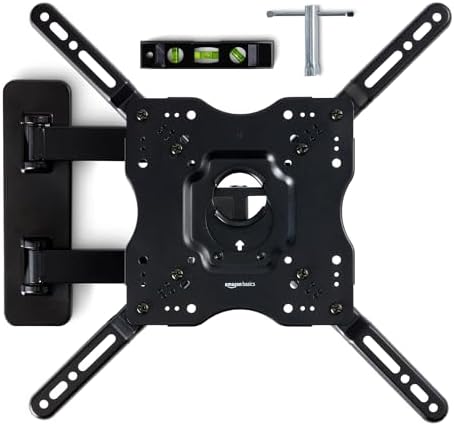
BEST OVERALL Amazon Basics Full Motion Articulating TV Wall Mount. A full motion articulating wall mount with swivel and tilt for 26 to 55 inch TVs, rated 4.6 across over 60,000 ratings.
BEST UL-LISTED FIXED UL Listed Fixed TV Wall Mount for 37 to 86 Inch Screens. A UL-listed fixed mount for 37 to 86 inch TVs with nearly 6,000 ratings.
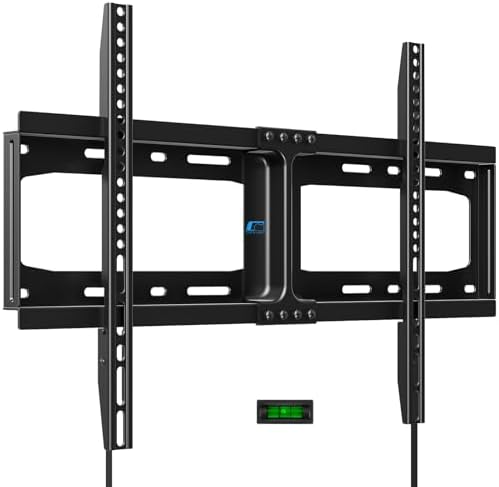
BEST FIXED HOME VISION Heavy Duty Fixed TV Wall Mount. A heavy-duty fixed mount for 32 to 86 inch flat-screen TVs, rated 4.7 across over 11,000 ratings.
How We Chose These Products
We started from Amazon listings for tv wall mounts and kept products rated 4.3 stars or higher, favoring those with at least 500 ratings. We allowed no more than two products per brand. Every pick has at least 500 ratings.
Comparison Table
| Pick | Mount type | Best for |
|---|---|---|
| Amazon Basics Full Motion Articulating TV Wall Mount | Full motion, swivel and tilt | 26 to 55 inch TVs |
| UL Listed Fixed TV Wall Mount for 37 to 86 Inch Screens | Fixed, UL listed | Simple, close-to-wall mounting |
| HOME VISION Heavy Duty Fixed TV Wall Mount | Fixed, 32 to 86 inch | A slim, simple look |
| Perlegear Full Motion TV Wall Mount for 42 to 97 Inch TVs | Full motion, up to 132 lbs | Large TVs needing movement |
| USX MOUNT Full Motion TV Wall Mount for 32 to 74 Inch | Full motion, up to 110 lbs | 32 to 74 inch TVs |
| ECHOGEAR Fixed TV Wall Mount for 32 to 90 Inch | Fixed, 1.18 inch profile | Slim, close-to-wall look |
| Perlegear Full Motion TV Wall Mount for 42 to 86 Inch | Full motion, 30% thicker arm | Heavier TVs |
| USX STAR Full Motion TV Wall Mount for 37 to 85 Inch | Full motion, up to 132 lbs | 16-inch stud spacing |
| IWORKBOARD Tilting TV Wall Mount for 32 to 90 Inch | Tilting | Larger TVs on a budget |
| IWORKBOARD Full Motion TV Wall Mount for 50 to 65 Inch | Full motion | Mid-size TVs |
The 10 Best TV Wall Mounts
1. Amazon Basics Full Motion Articulating TV Wall Mount
BEST OVERALL

A full motion articulating wall mount with swivel and tilt for 26 to 55 inch TVs, rated 4.6 across over 60,000 ratings.
Best for: 26 to 55 inch TVs
2. UL Listed Fixed TV Wall Mount for 37 to 86 Inch Screens
BEST UL-LISTED FIXED

A UL-listed fixed wall mount for TV sizes from 37 to 86 inches, rated 4.7 across nearly 5,800 ratings.
Best for: Simple, close-to-wall mounting
3. HOME VISION Heavy Duty Fixed TV Wall Mount
BEST FIXED

A heavy-duty fixed mount for 32 to 86 inch flat-screen TVs, rated 4.7 across over 11,000 ratings.
Best for: A slim, simple look
4. Perlegear Full Motion TV Wall Mount for 42 to 97 Inch TVs
BEST FULL MOTION LARGE

A UL-listed full motion mount for 42 to 97 inch TVs up to 132 pounds, rated 4.7 across over 8,000 ratings.
Best for: Large TVs needing movement
5. USX MOUNT Full Motion TV Wall Mount for 32 to 74 Inch
BEST MID-SIZE FULL MOTION

A full motion mount for 32 to 74 inch flat-screen TVs up to 110 pounds, rated 4.7 across nearly 10,000 ratings.
Best for: 32 to 74 inch TVs
6. ECHOGEAR Fixed TV Wall Mount for 32 to 90 Inch
BEST LOW-PROFILE FIXED

A fixed wall mount for TV sizes from 32 to 90 inches, up to 150 pounds with a 1.18-inch profile, rated 4.7.
Best for: Slim, close-to-wall look
7. Perlegear Full Motion TV Wall Mount for 42 to 86 Inch
BEST HEAVY-DUTY ARTICULATING

A full motion mount for 42 to 86 inch TVs up to 132 pounds with a thicker articulating arm, rated 4.7.
Best for: Heavier TVs
8. USX STAR Full Motion TV Wall Mount for 37 to 85 Inch
BEST FOR WOOD STUDS

A full motion wall mount for TV sizes from 37 to 85 inches, up to 132 pounds, fitting 16-inch wood studs, rated 4.7.
Best for: 16-inch stud spacing
9. IWORKBOARD Tilting TV Wall Mount for 32 to 90 Inch
BEST VALUE TILTING

A tilting TV wall mount for 32 to 90 inch TVs, rated 4.6 across over 3,000 ratings.
Best for: Larger TVs on a budget
10. IWORKBOARD Full Motion TV Wall Mount for 50 to 65 Inch
BEST COMPACT FULL MOTION

A full motion mount for 50 to 65 inch TVs, rated 4.6 across over 3,000 ratings.
Best for: Mid-size TVs
How to Choose a TV Wall Mount
| Factor | What to look for |
|---|---|
| Mount type | Fixed is slim; tilting reduces glare; full motion swings and extends. |
| Size and weight | Match the screen size range and weight capacity to your TV. |
| VESA pattern | Confirm your TV’s VESA matches the mount’s maximum. |
| Wall type | Wood studs, metal studs and masonry need different hardware. |
| Stud spacing | Check the mount plate width against your stud spacing. |
Buying and Care Tips
- Find studs with a stud finder and mount to the center of at least two studs where possible.
- Use the supplied hardware and tighten fully, but do not overtighten.
- Have a second person help lift the TV.
- Do not exceed the listed weight rating.
Honest Limits
- We did not test these products. The notes come from listings and customer ratings.
- We did not test these mounts. The notes come from listings and customer ratings.
- Listings show a range of TV sizes and weights, so check your TV’s size, weight and VESA pattern.
- Two Perlegear, two USX and two IWORKBOARD products are included, so some picks are similar.
- Ratings change over time, so check the current listing.
- Prices, colors, sizes and bundles change often on Amazon, so check the current listing.
- There is no single official authority source for this topic, so this guide relies on listing details and ratings.
Choosing the Right Wall Mount for TV Rooms
The best wall mount for TV use depends on the room more than the brand. A fixed mount holds the screen flat and close to the wall, so it gives the cleanest look when you always sit in the same spot. A tilting mount angles the screen down, which helps when the TV sits above eye level or when windows cause glare. A full motion mount swings and extends, so it suits corners, open-plan rooms and seating areas that are not straight in front of the screen.
However, more movement means more parts. Full motion arms add flexibility, but they also sit further from the wall and need careful installation. If you never plan to move the screen, a fixed or tilting wall mount for TV setups is simpler and often slimmer.
VESA Patterns and Weight Limits for a Wall Mount for TV
Every wall mount for TV screens lists three limits: screen size range, weight capacity and VESA pattern. The VESA pattern is the distance in millimeters between the mounting holes on the back of the TV, written as horizontal by vertical, such as 200 by 200. Your TV manual or the back of the screen shows the pattern, and the mount listing shows which patterns it supports.
- Screen size range: choose a mount whose range includes your TV, not one that only comes close.
- Weight capacity: compare it with your TV’s weight, and leave a margin for cables and accessories.
- VESA pattern: confirm that your TV’s pattern is listed. Adapters exist, but a direct match is simpler.
- Stud spacing: check that the mount plate can span the studs in your wall.
Several mounts in this list cover wide ranges, such as 32 to 90 inches. A wide range is convenient, but it does not replace the weight and VESA checks above.
How to Install a Wall Mount for TV Safely
The Consumer Product Safety Commission notes that flat-screen TVs can be mounted to a wall to prevent tip-overs, and it advises following the manufacturer’s instructions to secure them (CPSC: Anchor It). Your mount’s manual is therefore the first thing to read. As a general outline, installing a wall mount for TV screens follows these steps.
- Choose the height and find the wall studs with a stud finder.
- Hold the wall plate against the wall, level it and mark the holes.
- Drill pilot holes and fasten the plate with the hardware that came with the mount.
- Attach the brackets to the back of the TV using the screws sized for your VESA holes.
- Lift the TV with a helper, hook it onto the plate and lock it in place.
- Check that the TV is level and does not move when you nudge it gently.
Hardware differs for drywall, concrete and brick, so check the instructions for your wall type. If you are unsure, hire a professional. A tidy case such as the ones in our socket organizer guide also keeps drill bits and fasteners from going missing mid-job.
Height and Viewing Angle With a Wall Mount for TV
A common rule is to place the center of the screen near eye level when you are seated. Mounting a TV too high is a frequent mistake, because it strains the neck over a long movie. If the screen has to sit higher, for example above a dresser, a tilting wall mount for TV rooms lets you angle it down toward the seats.
Also think about heat and glare. Keep the TV away from direct sun, and check the TV manual before mounting it above a fireplace or a heat source. A full motion arm can turn the screen away from a bright window, which makes it a strong choice for sunny rooms.
Cable Management for a Wall Mount for TV
Plan the cables before you hang the screen. Decide where the power outlet, streaming box and soundbar will go, and run the cables behind the TV where possible. If you want to hide cables inside the wall, use cable rated for in-wall use and follow local electrical rules. For power, ask a qualified electrician instead of running a standard cord through the wall.
Common Wall Mount for TV Mistakes
- Skipping the VESA and weight check before buying.
- Mounting into drywall alone instead of into studs.
- Placing the screen too high for comfortable viewing.
- Forgetting that full motion arms need clear space to swing.
- Over-tightening screws, which can strip the holes or crack the TV casing.
Frequently Asked Questions
What is the best TV wall mount?
Based on ratings and rating volume, the Amazon Basics full motion mount is the most reviewed, and ECHOGEAR and HOME VISION lead for larger TVs.
What does VESA mean?
It is the standard hole pattern on the back of a TV, such as 400 by 400 mm. The mount must support your TV’s pattern.
Fixed, tilting or full motion?
Fixed is slimmest, tilting helps with glare and full motion lets you angle the TV.
Do I need studs?
Most mounts should be attached to studs or suitable wall anchors. Follow the manufacturer’s instructions.
How high should I mount a TV?
Many people place the center of the screen at eye level when seated. Choose what is comfortable for your room.
Can I mount a TV on drywall alone?
Not safely without proper anchors rated for the weight. Use studs when possible.
Do wall mounts fit all TVs?
No. Check size range, weight capacity and VESA pattern.
How much weight can a mount hold?
It varies by model. The listing states the maximum weight.
Can I install a TV mount myself?
Many people do, but consider a professional if you are unsure about your wall.
Are the lower-rated picks worth buying?
All picks are rated 4.6 or higher with thousands of ratings, so fit and type matter more than rating.
Wall Mount for TV FAQs
What size wall mount for TV do I need?
Match the mount to your TV, not just the screen size. Check that the listing covers your screen size range, your TV weight and your VESA pattern, which you can find in the TV manual.
Is a fixed, tilting or full motion wall mount for TV better?
Fixed mounts are slim and simple, tilting mounts reduce glare and help with high placement, and full motion mounts suit corners and shared seating areas. Pick the type that matches how you actually watch.
Can I install a wall mount for TV myself?
Many people do, using a stud finder, a level and the hardware in the box. Follow the manufacturer instructions, use a helper to lift the TV, and hire a professional if your wall type or the screen size makes you unsure.
The Bottom Line
For most buyers, the Amazon Basics full motion mount is the safest buy for mid-size TVs, and the ECHOGEAR or HOME VISION fixed mounts suit larger screens.
Whatever you choose, check your TV’s weight and VESA pattern, mount to studs and ask a professional if you are unsure.
Last reviewed: October 23, 2026.