The best dual monitor stand holds two screens side by side, frees up desk space and lets you set each screen at the right height and angle. Some stands clamp or bolt to the desk edge and use adjustable arms, while others are riser shelves that simply sit on the desk. Screen size and weight limits, VESA compatibility, desk thickness and how easily the arms adjust matter most for daily use. Many people choose a stand to improve posture and make a work or gaming setup feel less cluttered.
What is the best dual monitor stand? Based on ratings and rating volume, the VIVO dual desk mount and the HUANUO dual monitor stand lead this list, each with 4.6 stars across tens of thousands of ratings.
In short: check that the stand supports your screen size and weight, confirm your monitors have VESA mounting holes, and measure your desk thickness before you buy.
Check the back of each monitor for the VESA hole pattern, and compare screen size and weight with the stand limits. Measure the thickness and edge of your desk to be sure a clamp or grommet mount will fit. Riser stands need no VESA holes but give less adjustment.
This guide was written by researching customer ratings and product listings, not by testing each product ourselves. Below you will find our top three, how we chose, a comparison table, ten picks with honest pros and cons, a buying guide, tips and answers to common questions.

Recommended Dual Monitor Stands
As an Amazon Associate we earn from qualifying purchases. These are research-based picks, not products we have tested. How we choose.


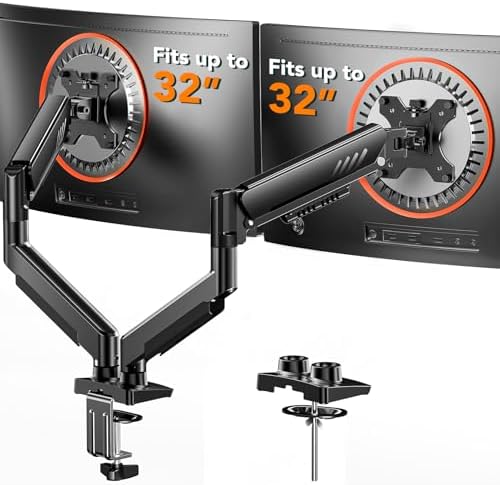

Our Top 3 Picks
BEST OVERALL VIVO Dual Monitor Desk Mount, Holds 2 Computer Screens. A VIVO dual monitor desk mount that holds two computer screens, rated 4.6 across over 61,000 ratings.
BEST GAS SPRING HUANUO FlowLift Dual Monitor Stand Fully Adjustable. A HUANUO FlowLift fully adjustable dual monitor stand, rated 4.6 across nearly 35,000 ratings.
BEST HEAVY DUTY ErGear Dual Monitor Stand Heavy Duty Adjustable. An ErGear heavy duty adjustable dual monitor stand, rated 4.4 across nearly 23,000 ratings.
How We Chose These Products
We started from Amazon listings for dual monitor stands and kept products rated 4.3 stars or higher, favoring those with at least 500 ratings. We allowed no more than two products per brand. Every pick has at least 500 ratings.
Comparison Table
| Pick | Type and mount | Best for |
|---|---|---|
| VIVO Dual Monitor Desk Mount, Holds 2 Computer Screens | Clamp, fully adjustable arms | Most desks |
| HUANUO FlowLift Dual Monitor Stand Fully Adjustable | Gas spring arms | Easy adjustment |
| ErGear Dual Monitor Stand Heavy Duty Adjustable | Heavy duty, clamp | Heavier screens |
| WALI Adjustable Dual Monitor Arm for 13-32 Inch Screens | Adjustable arm, 13-32 in | Standard monitors |
| WALI Extra Long Wooden Dual Monitor Stand Riser | Wooden riser | No clamp setups |
| VIVO STAND-V002F Dual Free-Standing Desk Stand | Free-standing base | No clamp or hole |
| BONTEC Dual Monitor Stand Riser Adjustable Length | Riser, adjustable length | Flexible spacing |
| HUANUO Dual Monitor Stand for 13 to 40 Inch | Up to 40 inch | Large monitors |
| ErGear Dual Monitor Arm Full Adjustable Mount | Full adjustable arm | Flexible setups |
| MOUNTUP Dual Monitor Stand for Desk | Clamp arms | Budget shoppers |
The 10 Best Dual Monitor Stands
1. VIVO Dual Monitor Desk Mount, Holds 2 Computer Screens
BEST OVERALL

A VIVO dual monitor desk mount that holds two computer screens, rated 4.6 across over 61,000 ratings.
Best for: Most desks
2. HUANUO FlowLift Dual Monitor Stand Fully Adjustable
BEST GAS SPRING

A HUANUO FlowLift fully adjustable dual monitor stand, rated 4.6 across nearly 35,000 ratings.
Best for: Easy adjustment
3. ErGear Dual Monitor Stand Heavy Duty Adjustable
BEST HEAVY DUTY

An ErGear heavy duty adjustable dual monitor stand, rated 4.4 across nearly 23,000 ratings.
Best for: Heavier screens
4. WALI Adjustable Dual Monitor Arm for 13-32 Inch Screens
BEST MID-SIZE

A WALI adjustable dual monitor arm for 13 to 32 inch screens, rated 4.3 across nearly 17,700 ratings.
Best for: Standard monitors
5. WALI Extra Long Wooden Dual Monitor Stand Riser
BEST RISER

A WALI extra long wooden dual monitor riser with two slots, rated 4.7 across over 17,000 ratings.
Best for: No clamp setups
6. VIVO STAND-V002F Dual Free-Standing Desk Stand
BEST FREE-STANDING

A VIVO free-standing dual monitor desk stand, rated 4.4 across over 16,000 ratings.
Best for: No clamp or hole
7. BONTEC Dual Monitor Stand Riser Adjustable Length
BEST ADJUSTABLE RISER

A BONTEC adjustable dual monitor riser with swivel, rated 4.6 across over 8,400 ratings.
Best for: Flexible spacing
8. HUANUO Dual Monitor Stand for 13 to 40 Inch
BEST LARGE SCREENS

A HUANUO dual monitor stand for 13 to 40 inch screens, rated 4.6 across over 5,600 ratings.
Best for: Large monitors
9. ErGear Dual Monitor Arm Full Adjustable Mount
BEST ERGEAR ALTERNATE

An ErGear full adjustable dual monitor arm, rated 4.5 across about 6,600 ratings.
Best for: Flexible setups
10. MOUNTUP Dual Monitor Stand for Desk
BEST VALUE

A MOUNTUP dual monitor stand for desk with arms for two monitors, rated 4.4 across about 7,000 ratings.
Best for: Budget shoppers
How to Choose the Best Dual Monitor Stand
| Factor | What to look for |
|---|---|
| VESA | Arm mounts need VESA holes on the back of each monitor. |
| Weight limit | Check the per-arm limit against your screen weight. |
| Screen size | Check the maximum screen size the stand supports. |
| Mount type | Clamp and grommet mounts suit most desks; risers sit on top. |
| Adjustment | Gas spring arms move easily; fixed arms hold steady. |
Buying and Care Tips
- Check VESA holes on both monitors before buying.
- Clamp onto a solid desk edge, not thin or hollow panels.
- Tighten arms and recheck them after a week.
- Use cable clips to keep wires tidy.
Honest Limits
- We did not test these products. The notes come from listings and customer ratings.
- We allowed two products each from VIVO, HUANUO, ErGear and WALI, which is within our two-per-brand limit.
- Desk thickness and monitor weight limits vary by listing, so check each one.
- Some listings are risers, which have no arm adjustment.
- No single authority source covers every monitor stand.
- Ratings change over time, so check the current listing.
- Prices, colors, sizes and bundles change often on Amazon, so check the current listing.
Who Should (and Should Not) Buy a Dual Monitor Stand
A dual monitor stand makes the most sense if you work with two screens every day. For example, developers, traders, video editors and anyone who keeps a document open beside a spreadsheet will feel the difference within a week. In addition, people with neck or shoulder strain often benefit, because an arm lets you raise both screens to eye level. OSHA workstation guidance suggests placing the top of the screen at or slightly below eye level, roughly 20 to 40 inches from your eyes.
However, a stand is not for everyone. If your desk is made of thin particleboard or glass, a clamp may crack or crush the edge. Likewise, if your monitors lack VESA holes, you will need a riser or a VESA adapter plate. Finally, if you sit at a shared or hot desk, a free-standing model or a riser is easier to move than a clamped arm.
Sizing the Best Dual Monitor Stand for Your Setup
Weight and screen size limits are the two numbers that matter most. Check both for each monitor, because the heavier screen decides which stand you need. The table below gives typical ranges by use case.
| Use case | Typical screens | What to look for |
|---|---|---|
| Home office, two 24 inch screens | Light, under 12 lb each | Most clamp arms or a riser will do |
| Gaming, two 27 inch screens | Medium, 12 to 18 lb each | Gas spring arms with at least 20 lb per arm |
| Editing, one 32 inch plus one 27 inch | Mixed, up to 22 lb | Heavy duty arms rated for 32 inch screens |
| Laptop plus one monitor | One screen plus a laptop tray | An arm with a laptop tray or a riser with a slot |
| Ultrawide plus one screen | Over 22 lb on one side | A single heavy duty arm per screen, not a shared post |
Also measure your desk. Most clamps fit desk tops between about 0.4 and 3.5 inches thick, but the exact range varies. If your desk has a lip or a drawer under the back edge, a grommet mount or a free-standing base avoids the problem. For carpeted rooms, a chair mat for carpet pairs well with a tidy two-screen setup.
Common Mistakes Buyers Make
- Ignoring the per-arm weight limit. Many listings quote a total figure, so divide it by two before you compare.
- Assuming every monitor has VESA holes. Some thin or curved models do not, so check the back panel first.
- Buying arms that are too short. Two 32 inch screens need long arms, otherwise they cannot sit flat side by side.
- Clamping onto a weak edge. Hollow or glass desks need a grommet or a free-standing base instead.
- Forgetting cable length. Once the screens rise, short HDMI and power cables may no longer reach.
Setup, Care and Maintenance
First, clear the desk and lay the parts out in order. Then attach the VESA plates to the monitors while they are face down on a soft towel. Next, fix the clamp or grommet base and tighten it firmly before adding any weight. Finally, hang each screen, set the gas spring tension and route the cables through the arm channels.
After a week, recheck every bolt, because new fittings settle. Every few months, wipe the arms and tighten the tension screw if a screen starts to drift. In short, five minutes of care keeps even a budget stand steady for years. If you are planning a wider desk refresh, our roundup of home office Black Friday deals covers the rest of the setup.
Alternatives to Consider
A single monitor arm plus a laptop stand suits people who use a laptop as the second screen. Similarly, a wall mount works well when the desk sits against a wall and the screens rarely move, and our guide to the best wall mount for TV explains the same VESA rules. Meanwhile, a wide riser shelf remains the simplest option, since it needs no tools and no VESA holes.
Frequently Asked Questions
What is the best dual monitor stand?
Based on ratings and volume, the VIVO and HUANUO stands lead this list. However, the right pick also depends on your screen size and desk.
Do I need VESA holes?
Arm mounts need VESA holes. In contrast, risers do not, because the monitor simply sits on the shelf.
Will it fit my desk?
First, check the desk thickness range on the listing. Then measure your desk edge to be sure.
What size monitors do they hold?
Check the screen size and weight limit for each pick.
Can I mount two different sizes?
Yes, most stands handle two different monitors, as long as each one stays within the weight and size limits.
Are gas spring arms better?
They adjust easily. However, they usually cost more than fixed arms.
Can I use it on a glass desk?
Sometimes, but check the listing and the glass thickness before clamping. Otherwise, choose a free-standing base.
Is a riser stand easier?
Yes, risers need no clamp or tools. On the other hand, they offer less adjustment.
How do I manage cables?
Many arms include cable channels or clips. In addition, reusable ties keep loose cables tidy.
Are the lower-rated picks worth buying?
Yes, because all picks are rated 4.3 or higher with thousands of ratings.
More Questions About Dual Monitor Stands
What is the best dual monitor stand for heavy screens?
Look for heavy duty arms rated for at least 22 lb per arm and 32 inch screens. The ErGear heavy duty stand and the HUANUO 13 to 40 inch model are the picks here with the highest limits.
How thick can my desk be for a clamp mount?
Most clamps fit desk tops between about 0.4 and 3.5 inches thick, but each listing states its own range. Measure your desk edge first, and use a grommet mount or a free-standing base if it falls outside that range.
Can a dual monitor stand hold a monitor and a laptop?
Yes, but you need an arm with a laptop tray or a riser with a laptop slot. Check that the tray supports the laptop weight and that the second arm still matches your monitor.
The Bottom Line
For most people, the VIVO dual desk mount or the HUANUO dual monitor stand is the safest buy here, and ErGear is a strong alternative.
Whatever you choose, check your VESA holes, weight limit and desk thickness first. After that, the best dual monitor stand for you is simply the one that fits those numbers.
Last reviewed: October 18, 2026.