Buying a VESA mount without checking the pattern is the most common mistake. Measure first, then compare the result to the mount’s specifications.

How to find your VESA size
- Measure the hole spacing horizontally and vertically in millimeters.
- Alternatively, check the manual or spec sheet.
- Finally, note the weight and screen size limits of the mount.

Monitor stands and VESA mount arms
| # | Product | Where to check |
|---|---|---|
| 1 | VIVO Dual Monitor Desk Mount, Holds 2 Computer Screens up to 30 inches and 22lbs Each, Heavy… | Check current price on Amazon |
| 2 | HUANUO FlowLift Dual Monitor Stand, Fully Adjustable Gaming Monitor Desk Mount for 1332 Comp… | Check current price on Amazon |
| 3 | ErGear Dual Monitor Stand, Heavy Duty Adjustable Monitor Desk Mount for 2 Screens up to 32 I… | Check current price on Amazon |
| 4 | WALI Adjustable Dual Monitor Arm for 13-32 inch Screens, 22 lbs per Arm | Check current price on Amazon |
As an Amazon Associate we earn from qualifying purchases. Prices and availability change, so confirm the price on Amazon before buying. These are research-based picks, not products we have tested. How we choose.


TV mounts
| # | Product | Where to check |
|---|---|---|
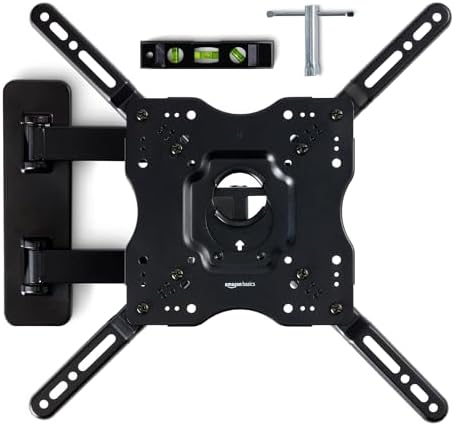
| 1 | Amazon Basics Full Motion Articulating TV Wall Mount, with Swivel and Tilt, for 26″ to 55″ T… | Check current price on Amazon |
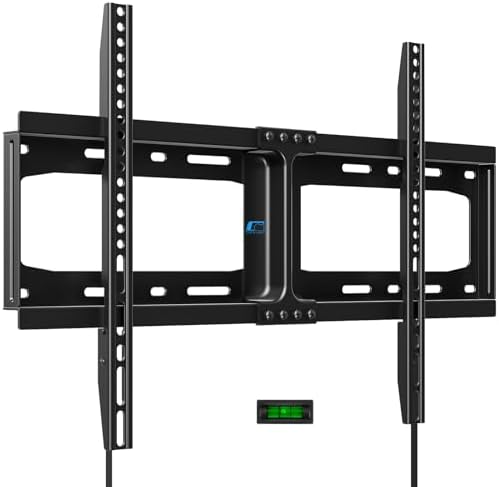
| 2 | UL Listed Fixed TV Wall Mount for 37-86 Inch Screens, Low Profile TV Mount Fits 16″, 18″, 24… | Check current price on Amazon |
| 3 | HOME VISION Heavy Duty Fixed TV Wall Mount for 32-86 Inch Flat Screen | Check current price on Amazon |
| 4 | Perlegear TV Wall Mount Full Motion for 4297 inch TVs up to 132 lbs | UL-Listed TV Mount Bra… | Check current price on Amazon |
As an Amazon Associate we earn from qualifying purchases. Prices and availability change, so confirm the price on Amazon before buying. These are research-based picks, not products we have tested. How we choose.


VESA mount tips
- Check the wall type and stud spacing.
- Also, use the supplied hardware.
- If you are unsure about wall mounting, ask a pro.
Setting Up a Dual Monitor Arrangement
Dual monitors boost productivity for many tasks but require thoughtful placement. Place your main monitor directly in front of you, and the second monitor beside it at the same height, angled slightly inward. If you use both equally, however, center the gap between them in front of you. A stand or dual arm lets you adjust distance and angle, and makes it easy to rotate one screen to portrait mode for reading or coding. Match screen sizes if possible, because mismatched sizes make it harder to move windows between displays.
Check that your computer’s graphics ports support two displays and that you have the right cables. Many laptops and desktops handle two screens, but older models may need an adapter or dock.
Cable and Port Considerations
- Check which ports your computer offers: HDMI, DisplayPort or USB-C.
- Then make sure cables are long enough for your stand’s range of movement.
- Use cable clips on the arm to prevent snagging.
- Alternatively, consider a dock if you want one cable to connect everything.
- Label cables so you can troubleshoot easily.
Desk Types and VESA Mount Methods
Clamp mounts attach to the edge of the desk and need a solid surface at least about an inch thick. In comparison, grommet mounts go through a hole in the desk and give a tidy look but need a hole. Freestanding bases sit on the desk and are the simplest option when you cannot drill or clamp. Glass desks, hollow desks and desks with a lip or crossbar may not work with every mount, so check the specifications. If your desk is thin or fragile, use a reinforcement plate if the maker provides one.
Troubleshooting Sagging Monitors
If an arm sags or a monitor tilts down on its own, the tension may be wrong. Most arms have an adjustment screw or tension setting; refer to the manual for the correct tool. Also check that the monitor weight is within the arm’s range, since too light a monitor can also make the arm bounce. Tighten the mounting screws, and recheck periodically.
VESA Terminology You May See
- MIS-D, MIS-E and MIS-F: names for different VESA mounting interface standards for monitors and screens.
- FDMI: the older name for the Flat Display Mounting Interface standard.
- Quick-release plate: a plate that attaches to the monitor so it can be hooked or clipped onto the mount.
- Weight capacity: the maximum weight the mount can support.
- Screen size range: the sizes the mount is designed for.
Choosing Between Fixed, Tilting and Full-Motion Mounts
Fixed mounts hold the display flat against the wall and are the slimmest option, but they offer no adjustment. In contrast, tilting mounts let you angle the screen downward to reduce glare, helpful if the TV is placed high. Full-motion mounts extend, swivel and tilt, useful in corners and rooms where you watch from different angles, but they are bulkier and need strong wall support.
Checking Your Wall
Before mounting, find the studs using a stud finder and mark them. Generally, wooden stud walls support heavier mounts, while metal studs or concrete need special anchors. Never mount a heavy TV on drywall alone. Check for wires and pipes behind the wall, and ask a professional if you are not sure.
Related guides
Common VESA Mount Sizes by Screen Size
The VESA mount pattern grows with the screen. The table below lists the patterns you will see most often. However, always confirm the exact figure in your manual, because slim and gaming monitors sometimes break the pattern.
| Screen type | Typical size | Common VESA pattern (mm) | Typical mount |
|---|---|---|---|
| Small monitor | Up to 24 inches | 75×75 or 100×100 | Desk arm or clamp stand |
| Standard monitor | 24 to 32 inches | 100×100 | Single or dual desk arm |
| Ultrawide or large monitor | 34 to 49 inches | 100×100 or 200×100 | Heavy-duty arm with a higher weight rating |
| Small TV | 32 to 43 inches | 200×200 | Fixed or tilting wall mount |
| Mid-size TV | 50 to 65 inches | 300×300 or 400×400 | Tilting or full-motion wall mount |
| Large TV | 65 to 85 inches | 400×400 to 600×400 | Full-motion mount rated for the weight, fixed into studs |
The pattern itself is published by the Video Electronics Standards Association as the FDMI standard, which you can find among the free VESA standards. In short, if the numbers on your screen and on the VESA mount match, the holes will line up.
Who Should (and Should Not) Buy a VESA Mount
A VESA mount makes sense for anyone who wants to free up desk space, run two or more screens or raise a monitor to eye level. It is also the right choice for a TV in a room where the stand would take up a table, or where children and pets could pull the screen over.
On the other hand, you may not need a VESA mount if your monitor already has a height-adjustable stand and you use a single screen. Likewise, renters who cannot drill into walls should look at a freestanding TV stand with a VESA mount plate instead of a wall bracket. For desk setups, our guide to the best dual monitor stands compares clamp, grommet and freestanding options. For living rooms, see the best TV wall mounts.
How to Spot a Low-Quality VESA Mount Listing
Mounts look similar in photos, so the details matter. Before you order a VESA mount, check these points:
- Weight rating per arm: a dual arm rated for 22 pounds total is very different from one rated for 22 pounds per screen. The listing should say which.
- Supported VESA patterns: a serious listing names every pattern, such as 75×75 and 100×100, rather than saying universal.
- Safety certification: look for UL listing on TV wall mounts. It means an independent lab has tested the bracket under load.
- Hardware included: a good mount ships with several screw lengths, spacers and washers. Listings with one bag of screws often fail on recessed holes.
- Reviews that mention sagging or stripped threads: these point to soft metal or weak gas springs.
Mounts are a popular holiday discount item. Therefore, if you can wait, our home office Black Friday guide explains how to tell a real price cut from an inflated list price.
Installing and Maintaining a VESA Mount
Installation takes about half an hour for a desk arm and longer for a wall bracket. First, attach the VESA mount plate to the screen with the supplied screws, finger-tight plus a quarter turn. Overtightening can crack the back panel. Next, fit the base or wall plate, check it with a level and only then hang the screen. Finally, route the cables with slack so the arm can move freely.
Afterwards, recheck the screws after the first week, because new mounts settle as the gas spring and joints bed in. Every few months, wipe dust from the joints and confirm that the tension still holds the screen in position. If a wall mount ever feels loose, take the TV down and inspect the anchors before using it again.
Frequently asked questions
What does 100×100 mean?
Holes are 100 mm apart both ways, so any VESA mount that lists 100×100 will fit.
Can I use a mount with a different VESA?
Only with an adapter made for it. Otherwise, the holes will not line up.
Do all monitors support VESA?
Most do, but some need an adapter. For example, many all-in-one computers have no holes at all.
How do I find studs?
Use a stud finder and follow the mount instructions.
Do you list prices?
No. Check the live price on Amazon.
What does VESA 100×100 mean?
The mounting holes are 100 millimeters apart horizontally and vertically.
Can I use a VESA mount on any monitor?
Only if the monitor has VESA holes that match the mount’s pattern and the weight is within the limit.
How do I find the weight of my monitor?
Check the spec sheet or manual and use the weight without the stand.
Is it safe to mount a TV on drywall alone?
No. Use studs or anchors rated for the weight, and follow the mount’s instructions or ask a professional.
More questions about VESA mount sizes
Is a VESA mount the same for monitors and TVs?
The standard is the same, but the patterns differ. Monitors usually use 75×75 or 100×100, while TVs use larger patterns such as 200×200, 400×400 or 600×400.
Can a VESA mount hold a curved monitor?
Usually yes, as long as the curved screen has standard holes and the mount can carry its weight. Some curved models need the spacers that come with the mount because the back is not flat.
What screws does a VESA mount use?
Most monitors use M4 screws and most TVs use M6 or M8. The thread size is listed in the manual, and a good mount includes several lengths.
Product picks are research-based, not tested by us. Check current prices and details on Amazon.
More guides you may like